
Manage your agents from any device
Grove is a terminal program first. The web dashboard puts the same fleet on any device.
Starting a workspace
The landing route is a composer, not a dashboard (launch-surface.tsx). Type the task and send it.
- Project, directory, agent, model, runtime and branch fill from the configuration cascade as pills. Touch one to change it.
- The Agent pill carries Session mode for Claude Code, Codex and OpenCode, a native session or the terminal.
- Custom… on the model pill takes any typed id, forwarded unchanged.
- More options opens the full create form. Go to fleet shows everything running.
The tour
The first visit opens a guided tour of eighteen stops (onboarding/), once per browser.
- It walks the composer, attachments and annotation with a sample photo, then a fictional Sample · workspace served in your browser, ending on its Diagram tab.
- The sample vanishes when the tour closes and nothing it typed is ever sent.
- Take the tour sits under the composer and in the account menu. Left and Right move, Esc leaves.
The rail and the fleet
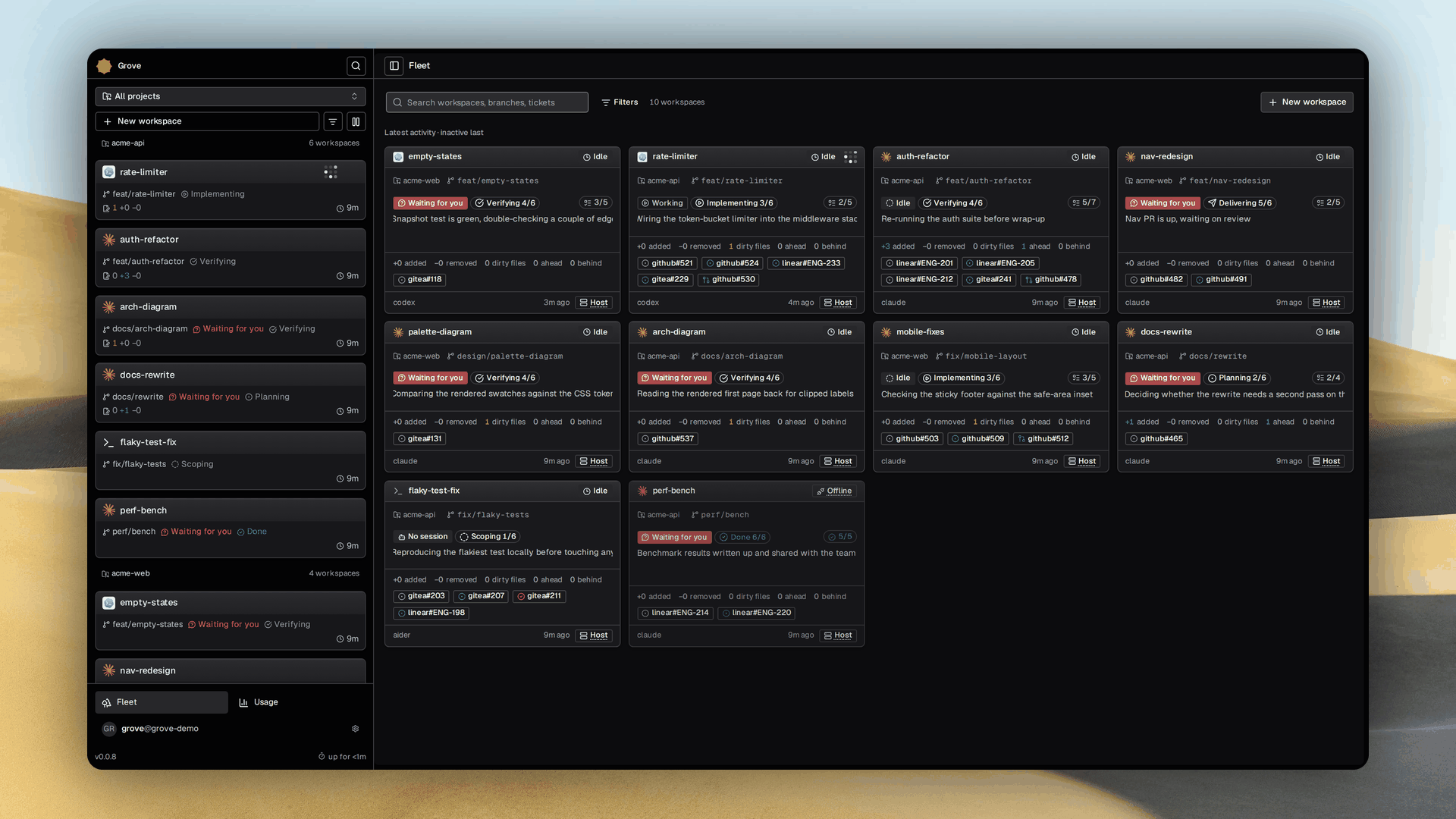
A collapsible rail (app-sidebar.tsx) runs down every route, and Fleet (fleet-dashboard.tsx) is the same list as a grid of cards.
- The rail holds New workspace, search, a filter, then every workspace as one flat list by recency, each row an agent mark, title,
project · branchand one glyph for what is most urgent. [ hides it. - The filter (fleet-filter.tsx) is shared by rail and grid. Needs attention, agent state and project, each with a live count.
- Each card (workspace-card.tsx) says what this is, what is happening and how much it has done, with an attention badge when it needs you.
- Below the list sit Fleet, Usage and the account menu with Sessions, Gallery, the theme toggle and sign out.
Creating a workspace
New workspace and More options open one form (create-workspace-dialog.tsx). Project, title and agent are required, the rest falls through to the cascade.
- Task, the agent's first message, or blank to type it once the workspace opens.
- Agent, Model, and Session mode for Claude Code, Codex and OpenCode.
- Runtime, Host or Container, and Brief, whether Grove sends its own briefing.
- Branch, auto named from the title, an existing branch, or a new name.
- Ticket, an issue on Gitea, GitHub or Linear to publish progress to.
Working in a session
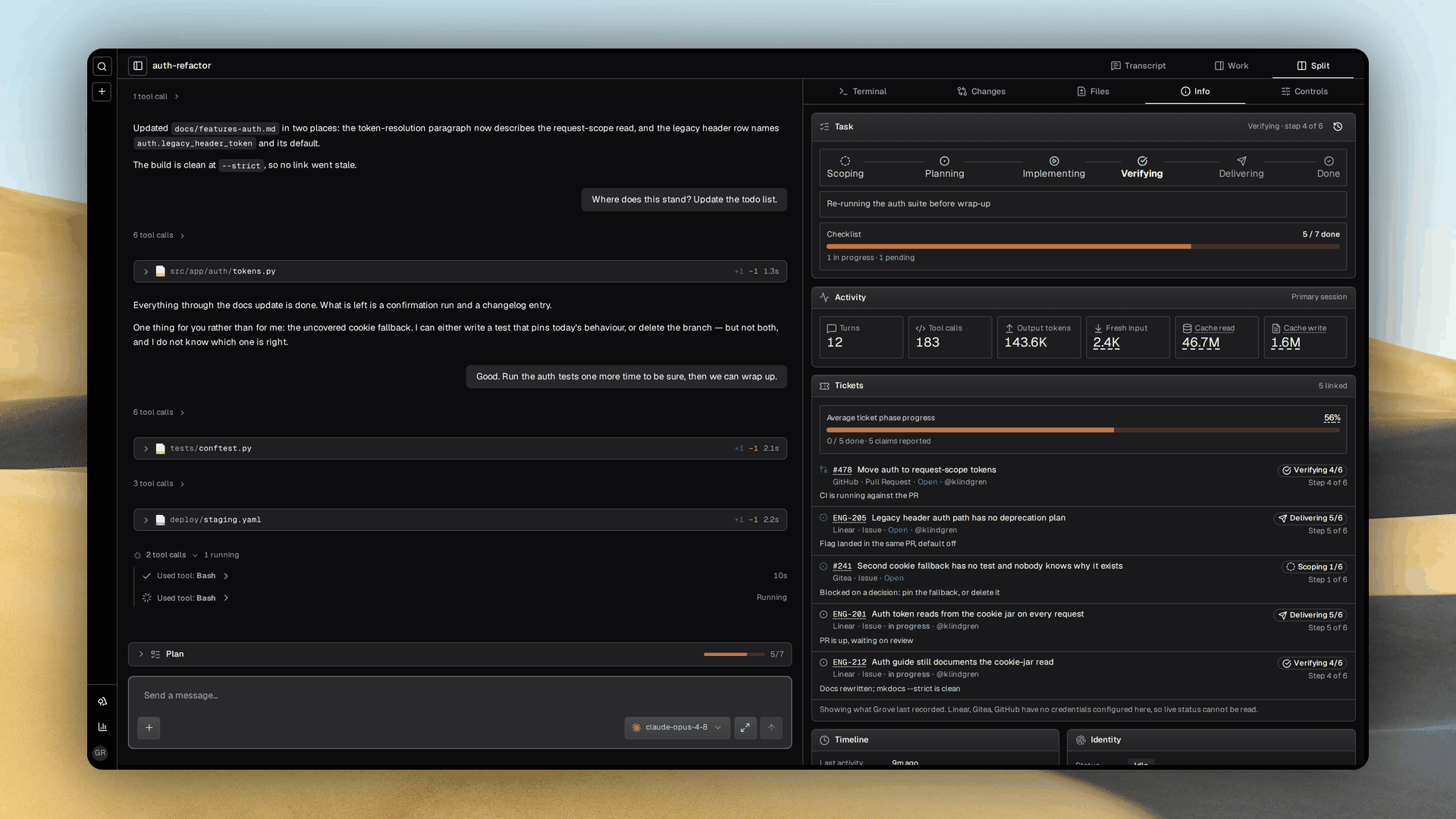
Three zones. The rail, the transcript, and a work panel (work-panel.tsx) with a tab per question.
| Tab | What it shows |
|---|---|
| Terminal | The agent's live tmux pane. For a native workspace it is Stream, the worker's event log, one frame per line. |
| Changes | Divergence from the base branch, working tree churn, commits since the fork point. |
| Files | The per file diffs the agent reported. |
| Info | Task progress, tickets with their phases, activity metrics, identity, timeline, and the lifecycle actions. |
| Controls | The model switch, a copyable attach command, a public share link, and the agent's slash commands, skills and MCP servers. |
| Diagram | One .drawio file in draw.io, editable while collaboration is active. See Diagram collaboration. |
- The header (shell-header.tsx) carries the title, live status, Interrupt while it runs, and the pane switcher. Wide windows split, narrow ones open transcript first.
- Pause, Resume, Respawn and Kill live on the Info tab.
- The share link needs no login, reads the transcript read only until it expires or you revoke it, and takes a passcode.
Steering the agent
The transcript (thread.tsx) shows your messages, the agent's replies, and tool calls grouped into collapsible runs.
- The composer stays enabled while the agent works. Enter sends, Shift+Enter makes a new line, Interrupt stops it mid turn.
- A live question is a card in the thread's footer (pending-question.tsx). A single choice sends on tap, anything else shows Submit.
- A message sent mid turn joins a collapsed queue with a count in its header.
- Paste a screenshot, annotate it, and the agent is handed the path. See Attachments and annotation.
The Session Catalog
Sessions, in the account menu, lists every agent session on the machine, searchable by title, location, agent kind or branch. Open one and the conversation renders read only. Session history covers the same ground in the TUI and CLI.
The Gallery
Gallery, beside Sessions, is every .drawio in any repository Grove knows, tracked, untracked or drawn under a workspace's .grove/attachments/.
- Each card shows the first page and the session that produced it. Its menu opens a read only viewer, downloads the file, exports a PNG, and opens the owning workspace or session.
- Editing stays in the workspace's own tab, see Diagrams.
The usage audit
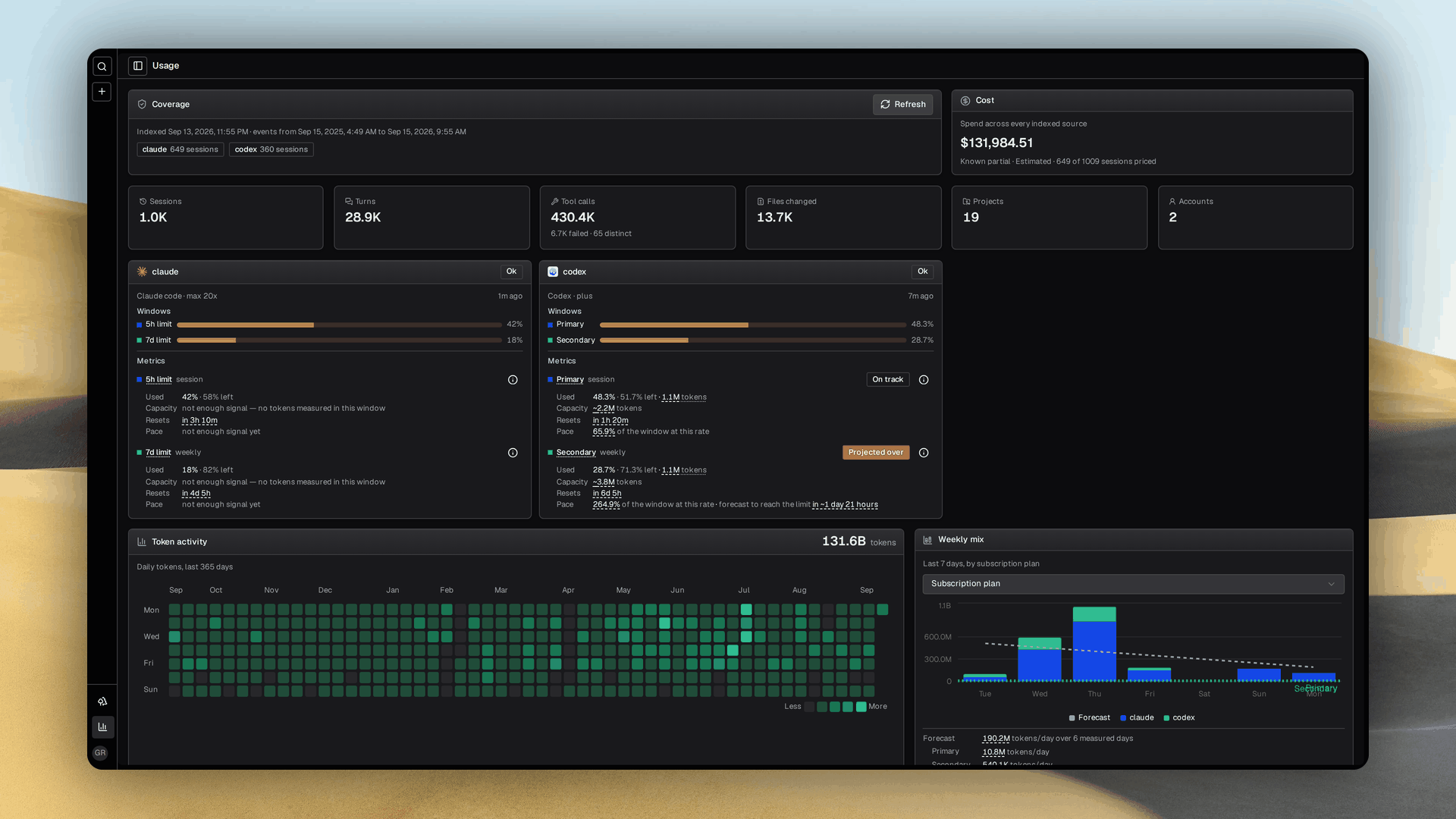
Usage answers what the fleet spent, derived from transcripts on disk, so it needs no invoice and works offline.
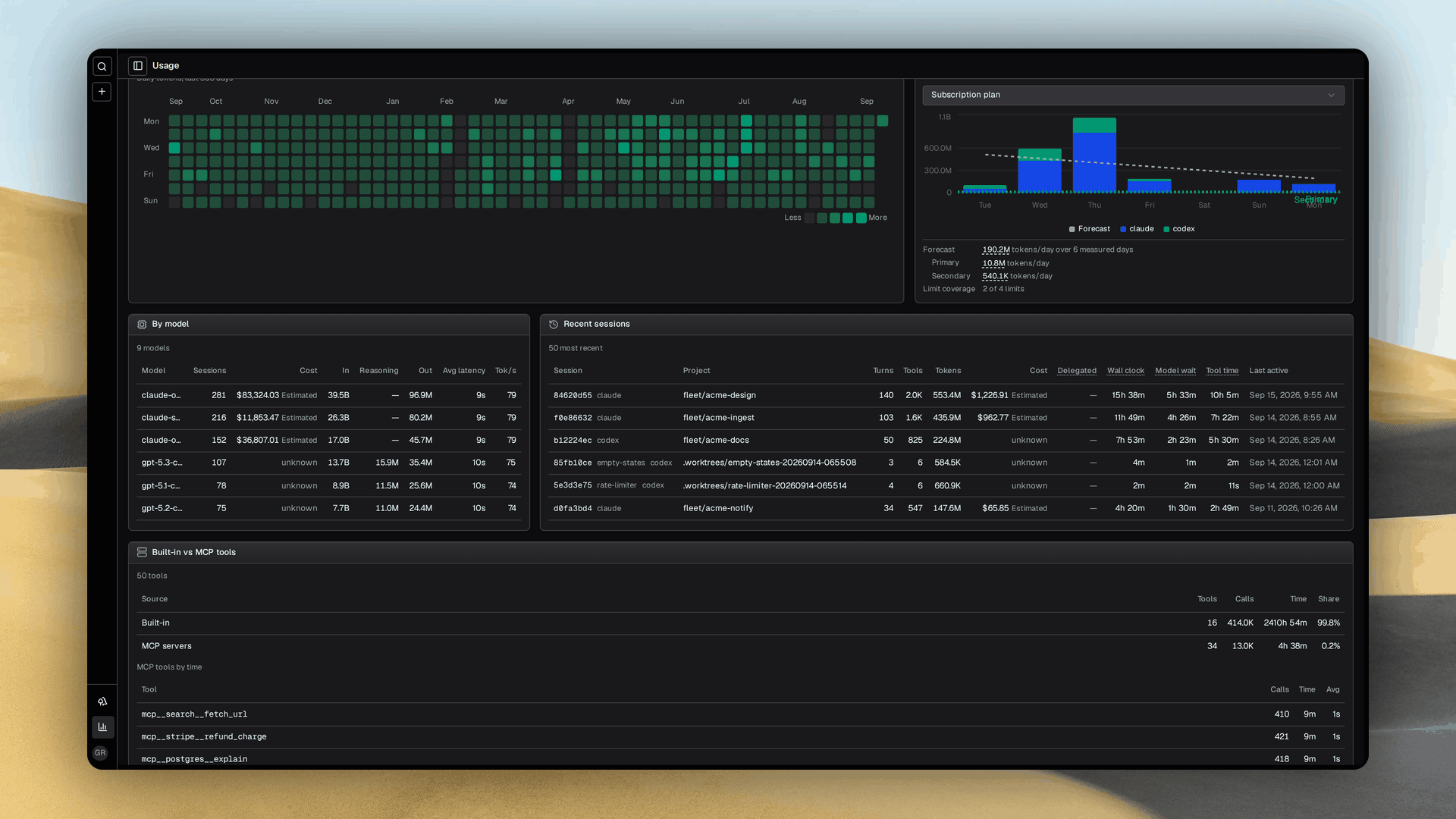
- Tiles count sessions, turns, tool calls, failures and files changed. A heatmap shows a year of daily tokens, breakdowns split any metric by provider, project, model, tool or token class, and a table lists the sessions behind the totals.
- Clock time counts concurrency once. Compute time sums every sub agent, so six agents can bill more compute than the session lasted.
- Cost is labeled a partial estimate when some sessions cannot be priced. Missing rates stay unknown, never free.
- Subscription windows sit beside the spend, and the same sessions become traces under telemetry and tracing.
Running it
The dashboard is two processes. A daemon exposing Grove's engine over HTTP, and a Next.js app the browser talks to.
# Build the web app once (repeat after each upgrade)
make webapp-build

# Run the two processes
grove daemon serve     # terminal 1, loopback, port 7421
cd webapp && npm run start   # terminal 2, serves the build on 0.0.0.0:3000
- Open http://127.0.0.1:3000, or
http://<machine-ip>:3000from a phone once you pair it.GROVE_DAEMON_URLinwebapp/.env.localpoints at a remote daemon. - The browser only calls the web app's own origin. Next.js proxies each call to the daemon with the paired session's token, a receptionist carrying each request to the back office. See Authentication & pairing and the
webapp/README for the dev server.
flowchart TB
    Browser(["Browser<br/>LAN:3000"])
    Web(["Next.js<br/>0.0.0.0:3000"])
    Daemon(["Daemon<br/>127.0.0.1:7421"])
    Browser -->|http| Web
    Web -->|"http, /api/grove/* (BFF proxy)"| Daemon
Always-on with systemd
make webapp-build                 # npm ci + npm run build
WITH_WEBAPP=1 make systemd        # write grove-daemon + grove-webapp units
WITH_WEBAPP=1 make systemd-enable # reload, enable, start now
loginctl enable-linger "$USER"    # survive logout (remote hosts)
A daemon hiccup reports unreachable without taking the dashboard down. After pulling new source, make webapp-build && systemctl --user restart grove-webapp. Ports override with DAEMON_PORT=7777 WEBAPP_PORT=3030.
Reaching it from outside the network
The daemon's loopback bind is deliberate, so forward the web app's port instead.
Tailscale, WireGuard or a reverse proxy work the same way. Widening the daemon's bind is the wrong lever, see the security model.
Fetching model prices
Each pricing source pairs a LiteLLM API base URL with the name of an environment variable holding its key, which the daemon behind the web Refresh button must also see.
{
  "usage": {
    "pricing": {
      "sources": [
        {
          "base_url": "https://gateway.example.com/v1",
          "token_env": "GROVE_PRICING_API_KEY"
        }
      ],
      "aliases": {
        "team-fast": "priced-model"
      },
      "models": {
        "priced-model": {
          "input": 2,
          "output": 10,
          "cache_read": 0.2,
          "cache_write": 2.5
        }
      }
    }
  }
}
- Manual prices are USD per million tokens and override fetched entries. Aliases are explicit, and conflicting prices for one model are withheld until you override.
grove usage backfillrefreshes usage and prices from stored counts and never exports a transcript.
See also
- Authentication & pairing: how a new device gets access.
- CLI:
grove daemon serveandgrove auth. - Agent activity and sessions: the signals behind the rail and terminal pane.
- Status semantics: what each glyph and color means.
webapp/README: the contributor surface.