
See which agent needs you
Run six agents and you cannot watch them. Grove puts the fleet on one wall that answers one question. Who needs me right now?
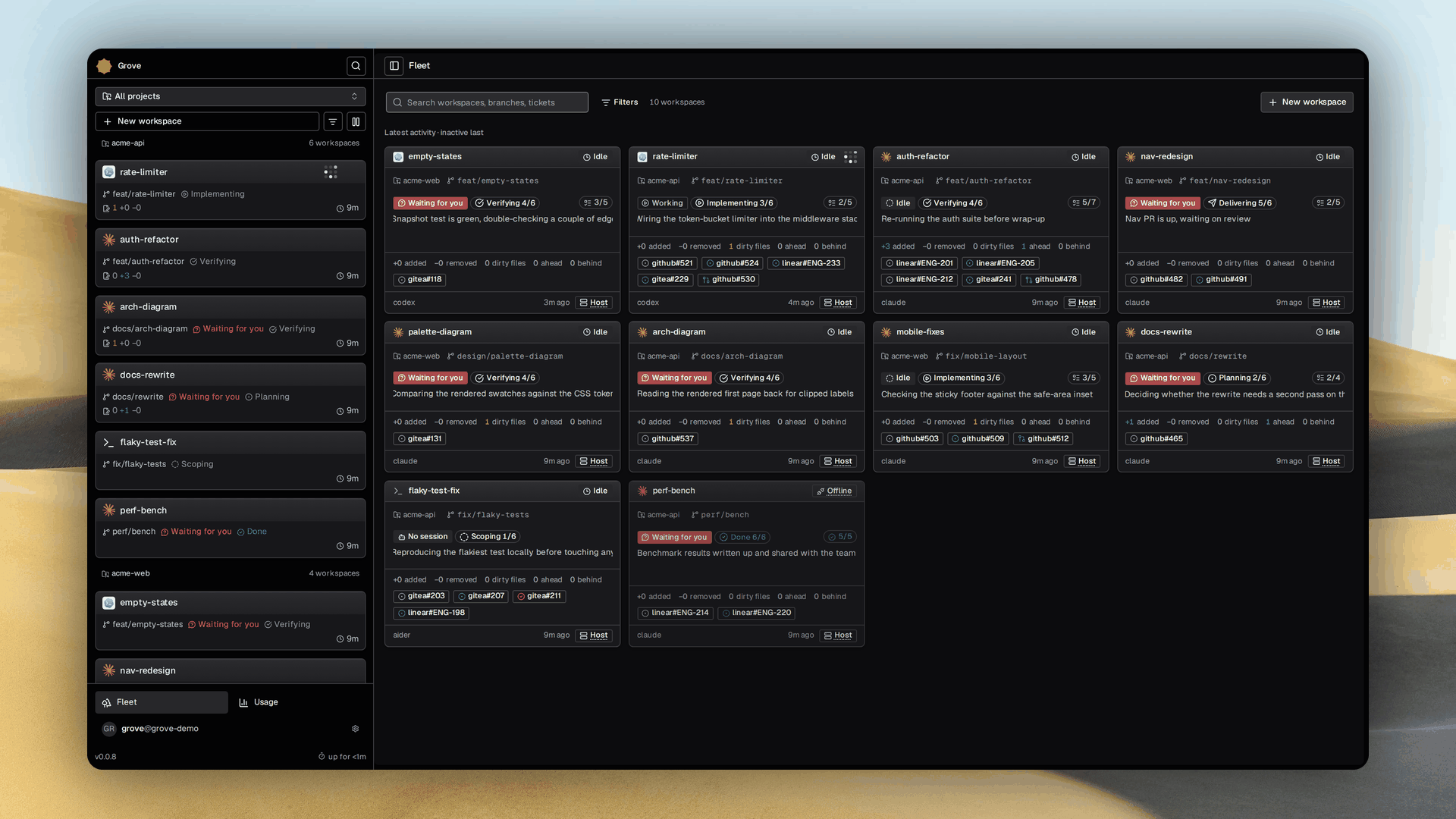
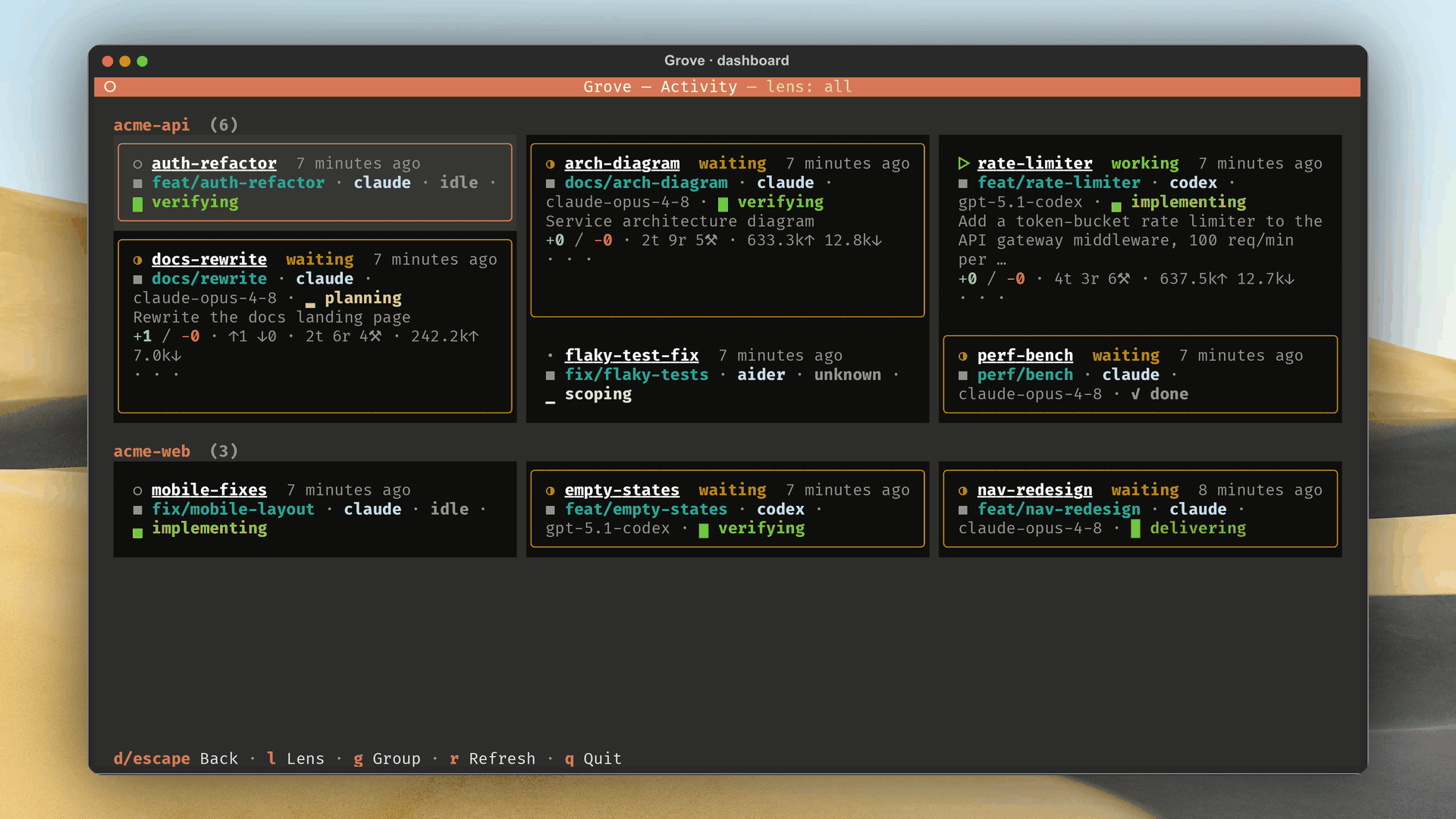
Watch the whole fleet
- Five agents are fine and one has sat on a permission prompt for twenty minutes. Finding out no longer means cycling every tmux window.
- Live activity is what every agent is doing now. Session history is what happened.
- Both are read only, built from transcripts and git state on disk, so steering sends a fresh follow up rather than rewriting the record.
- Three tiers. Active pulses at full brightness, Attention for waiting, blocked and error takes the accent and sorts to the front, Dormant dims. Bright means look here.
The Activity Dashboard
- Press D in the TUI, or open the web dashboard home. Same wall, every session across every repository, attention first.
- The browser streams a flat fleet grid beside the rail, and filters narrow both by project, state or attention.
- Each card shows agent, state, title, project, summary, git changes, todo progress and tickets, with the live terminal one tab away.
- TUI tiles group by project, and the ones that need you expand to a terminal tail.
What Grove watches
- Agent state, for agents Grove can introspect.
starting,working,waiting,blocked,idle,error, andunknownbefore a session exists. Waiting means the agent wants you, blocked means an explicit prompt. - Terminal output, for agents it cannot. A producing tmux window reads as active, a quiet one as idle.
- Dirty files and recent commits, so the branch's shape is visible before anything is pushed.
- Agent state also shows on the workspace list and the peek rail. It is not workspace status. A workspace can be ACTIVE while its agent is WAITING, because status describes the workspace and agent state the conversation inside it.
The peek rail
The right hand rail of the TUI shows git position, agent metrics and a live preview for the selected workspace without attaching. It is the per workspace companion of the dashboard above.
| Card row | What it carries |
|---|---|
| Git | Branch, ahead, behind, dirty count and age |
| Agent | Model, turn, reply and tool call counts, token usage and agent state |
| Task phase | The task phase the agent reported, with bounded todo progress |
| Commits | The three most recent commits |
- Tickets is its own panel because a workspace can carry several. Each linked ticket takes one line, a pull request leads with an arrow in the colour of its state, and a workspace with none shows no panel.
- Transcript groups every consecutive run of tool calls into one row and never expands one, since it stays a glance surface. Press S for the sessions browser.
- Terminal mirrors the tmux pane with output, ANSI colours and cursor position, four times a second while running, and its border turns clay when the pane is live. For a native workspace the tab is named Stream and mirrors the worker's event log instead of an agent UI.
- Transcript is the default once the agent has recorded turns, terminal otherwise, and your choice sticks per workspace. Transcripts outlive their worktrees, so a paused workspace still shows one.
Which agents Grove can read
claude_codeandcodexread state, turns, token counts, titles and history from their transcripts.mewboreads a remote session through its REST API.genericfalls back to the terminal output signal.- The built in
claudeandcodexagents already carry their kinds. See Agents.
The agent's own todo list
- Claude Code
TodoWrite, Codexupdate_plan, and Mewbo task boards give an agent a running checklist. - Grove shows the inferred list in
grove show, TUI and web cards, andgrove_get_workspace_todo. - The issue-ops sticky comment renders its bounded progress.
- The list is read only. A todo list is inferred while a task phase is stated.
Session history
- Grove discovers recorded sessions across the repository root and every worktree.
grove sessions list                # every session, newest first
grove sessions show 7b3f2c1a       # one conversation, as turns
grove sessions dump 7b3f2c1a       # the raw transcript records
- Filters for agent, workspace, and time window live on the CLI page.
- The web detail page replays each conversation as the browser twin of
grove sessions show. - Grove labels sessions it launched and sessions started by hand.
Adoption and recovery
- Grove verifies a candidate transcript against the workspace pane before treating it as live, in sessions.py and manager.py.
- Resume repeats that check, and a rejected successor leaves the old pointer stale with a blank transcript.
- Remap it with
grove sessions remap WORKSPACE SESSION, the TUI X key, or the web picker.
The Session Catalog: every session on this host
grove sessions list --hostscans every session store on the machine.
- Its table adds
PROJECT,BRANCHand a live marker for a matching agent process. - The web dashboard's Sessions screen and the TUI
hkey show the same catalog. - It is read only and adopts nothing.
Where the context was compacted
An agent compacts when its context fills, replacing the conversation so far with a summary. The transcript marks that cut rather than leaving a silent gap, because a jump with no marker reads as an agent that inexplicably forgot.
- Each boundary reports what it cost. The mark carries the tokens dropped, how long the compaction took and which model performed it, alongside the replacement summary.
- The summary is kept whole. It is the only surviving record of the turns the agent discarded, so it opens in full rather than being trimmed.
- A missing figure is stated as missing, never as zero. Providers record different amounts, so a fact none of them reported is left out of the line instead of being printed as a measured zero.
- Compaction is recorded for the audit too. Each event lands in the usage history and, when telemetry is on, as its own span, so a session's compactions are countable after the fact.
Trigger reporting differs by agent. Claude Code records whether a compaction was manual or automatic and how long it took. Codex records neither, so Grove shows the compaction without claiming a cause.
How the rail keeps up
- Every helper is best effort. A failure leaves a slot empty, never a blocked render loop, so observation stays quiet while Workspace lifecycle reports action failures out loud.
- A running pane refreshes four times a second and the slower git and agent facts on their own tick.
- ACTIVE and IDLE flip on the tmux window's last output at
tmux.activity_threshold_seconds, default30. - A container workspace captures the agent pane inside its container with no host attachment open.
- WorkspaceManager.pane_target picks the agent pane and falls back when the layout has changed under it.
See also
- Telemetry and tracing makes the same sessions queryable as OpenTelemetry traces.
- TUI tour covers the dashboard screen and its keys.
- Web dashboard covers the live grid and transcript. The web dashboard's Sessions screen covers the catalog.
- CLI covers
grove sessions list,show, anddump. Agents covers agent kinds. - Task phase records stated progress. Status semantics covers workspace state.